TID and HID
Each record in Goupile has three unique identifiers:
- A TID identifier, which is a 26-character string encoding the time of the record and a random part (e.g., 01K5EY3SCEM1D1NBABXXDZW7XP).
- A sequence identifier, which is an incremented number for each record, starting at 1.
- A HID identifier (for Human IDentifier), qui correspond par défaut à l'identifiant séquentiel mais qui peut être personnalisé pour inclure d'autres éléments.
Use the TID to join different tables in exported data. The TID value is available in the __tid column of each exported table.
Custom counters
Incremental counters
You can create custom counters that are incremented for each record (starting at 1) based on conditions defined in the code.
The meta.count(key, secret = false) function is used to create a counter.
The example below shows how to divide patients into 3 groups. After each record, one of the three counters below is incremented and assigned to the participant:
- smoking_active: counts the number of active smokers
- smoking_stopped: counts the number of former smokers
- smoking_no: counts the number of non-smokers
form.enum("smoking", "Smoking", [
    ["active", "Active smoker"],
    ["stopped", "Former smoker"],
    ["non", "Non-smoker"]
])

if (values.smoking)
    meta.count("smoking_" + values.smoking)
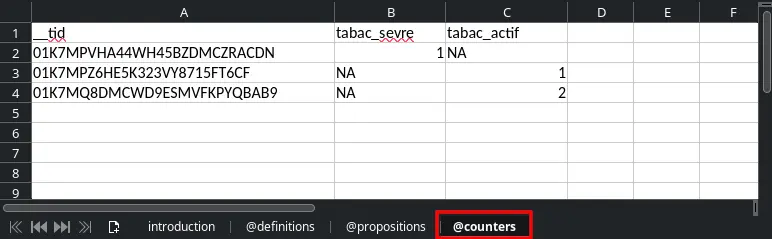
After including several participants, the counter value for each participant is available in the export under the @counters tab of the XLSX file. The screenshot below shows 3 participants: the first is a former smoker, the next two are active smokers.
Randomization
Goupile's randomization system is an extension of the counters introduced above.
Use the meta.randomize(key, max, secret = false) function to assign a randomized counter. The randomized counter is not sequential; each participant receives a random value between 1 and max, in blocks of size max.
Once max participants are included, the counter resets for the next block.
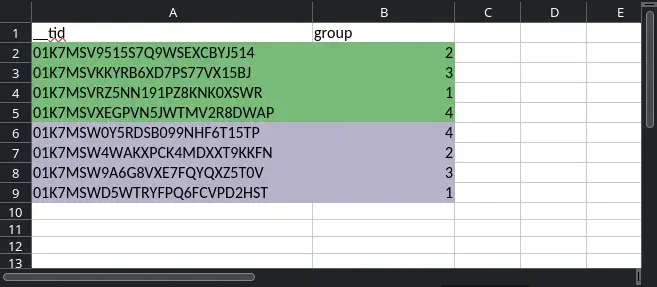
For example, setting a maximum of 4 ensures that the first 4 participants receive values 1, 2, 3, and 4 in random order. The next 4 participants will do the same:
meta.randomize("group", 4)
As in the sequential counter example, you can stratify randomization by using a different key, depending on a variable in the form.
The example below performs randomization stratified by gender—participants receive a randomization number depending on their gender:
- groupe_M: male randomization
- groupe_F: female randomization
- groupe_NB: non-binary randomization
form.enum("gender", "Gender", [
    ["M", "Male"],
    ["F", "Female"],
    ["NB", "Non-binary"]
])

if (values.gender)
    meta.count("group_" + values.gender)
The value of each randomized counter is available in the @counters tab of the export file. The screenshot below shows group assignments for 8 inclusions using meta.randomize("group", 4).
By default, counters are not secret, meaning they can be read from another form page and displayed or used to adapt subsequent pages.
To define a secret counter that is only available in the final export file, set the third parameter secret of the randomization function to true:
// Secret randomization
meta.randomize("group", 4, true)
Customizing identifiers
Custom HID
The HID identifier displayed in the monitoring table corresponds by default to the sequential ID generated for each record.
However, you can customize it to include other elements (including the sequence number, if you wish). To do so, assign a value to meta.hid in the form script.
The example below splits participants into two randomized groups and includes the selected group in the identifier, which takes the form SEQUENCE-GROUP.
form.number("*age", "Age", {
    min: 0,
    max: 120
})

let rnd = meta.randomize('G', 4)
let group = "AABB"[rnd - 1] // Index must be 0 to 3, but the random value is between 1 and 4

meta.hid = thread.sequence + '-' + group
Summary
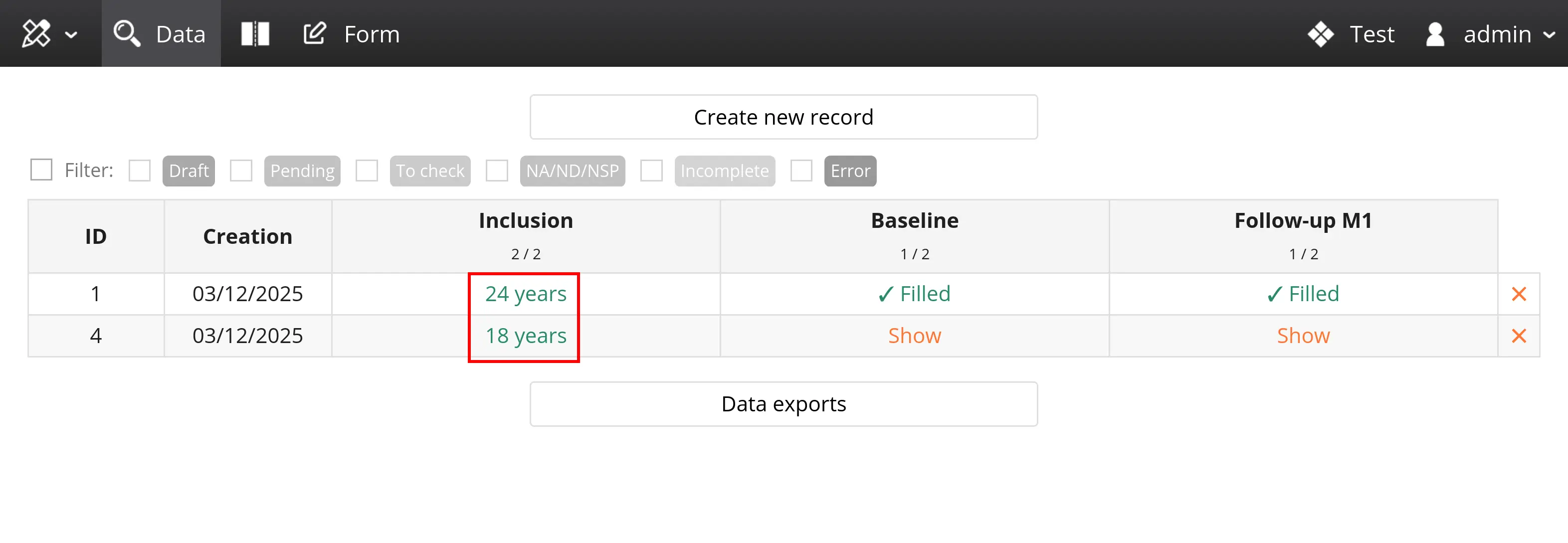
For each form page, you can define an additional identifier called summary, which is displayed instead of the date in the data monitoring table of records (see screenshot below), in the column corresponding to the page.
To do so, assign a value to meta.summary in the form script. In the example below, the value displayed in the "Introduction" column is built based on the age entered in the corresponding variable:
form.number("*age", "Age", {
    min: 0,
    max: 120
})

if (values.age != null)
    meta.summary = values.age + (values.age > 1 ? ' years' : ' year')
You can use this feature to display a manually created inclusion number (for instance, if the inclusion number is generated outside Goupile), as shown below:
form.number("inclusion_num", "Inclusion number")
meta.summary = values.inclusion_num